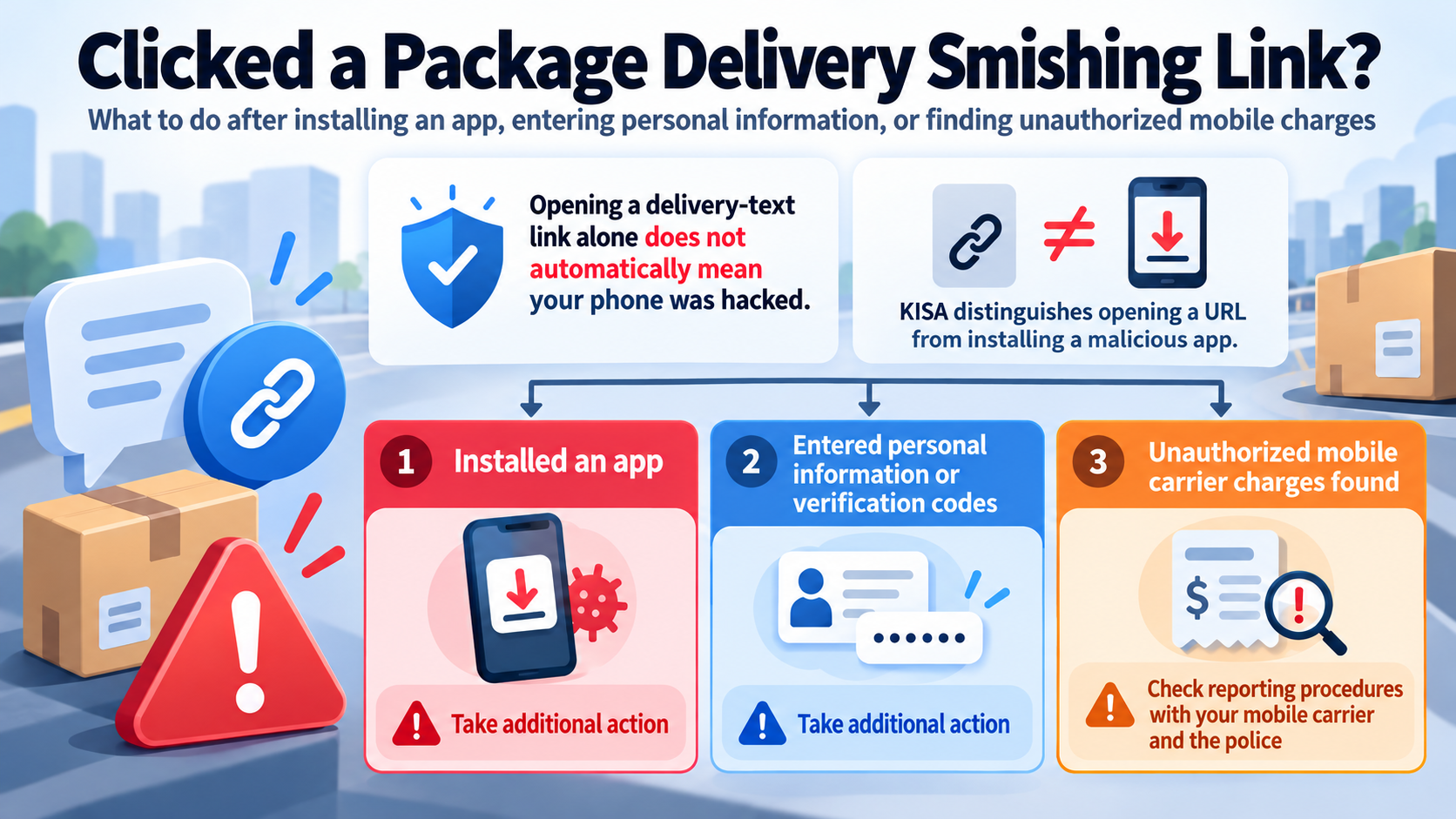
Clicking a link in a text message about a delivery error or redelivery does not automatically mean your phone has been hacked. The Korea Internet & Security Agency (KISA) distinguishes between clicking a URL and installing a malicious app. However, additional action may be necessary if you installed an app or entered personal information or verification codes. If unauthorized mobile carrier billing charges have occurred, you should check the reporting procedures with your mobile carrier and the police.
What matters most is not simply whether you clicked the link, but what you did afterward.
Someone who opened a delivery-related link and closed the page without entering anything needs to check different things from someone who installed an app or entered a verification code to confirm a delivery.
Clicking a URL in a text message does not, by itself, confirm that your device has been infected with a malicious app. KISA distinguishes between simply opening a link and installing an application through that link. If you only opened the link, first check whether you installed any apps or entered any information.
What Is Package Delivery Smishing, and Why Does Your Response Depend on What You Did?
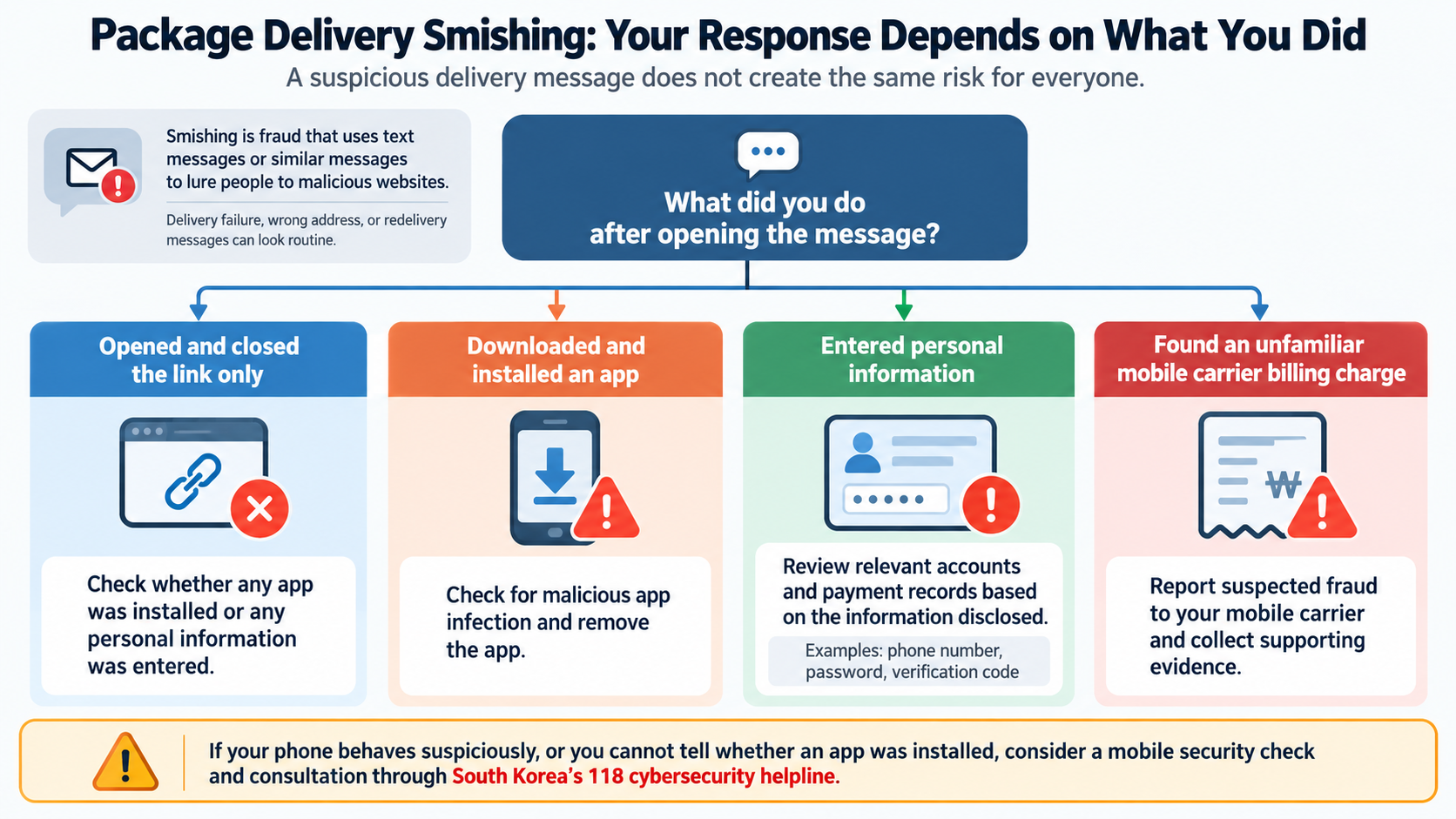
Smishing is a type of fraud that uses text messages and similar communications to lure people into visiting malicious websites.
Messages about failed package deliveries, incorrect addresses, or redelivery requests can appear routine, making recipients more likely to open them without suspicion.
However, not everyone who opens a suspicious message faces the same situation.
Opened and closed the link only: Check whether any malicious app was installed or personal information was entered.
Downloaded and installed an app: Check for malicious app infection and take steps to remove the app.
Entered a phone number, password, verification code, or other information: Review the relevant accounts and payment records according to the type of information disclosed.
Discovered an unfamiliar mobile carrier billing charge: Report the suspected fraud to your mobile carrier and collect supporting evidence.
You also should not assume that simply visiting a suspicious website means every potential risk has been eliminated. If your phone behaves suspiciously or you cannot determine whether an app was installed, a mobile security check and consultation through South Korea's 118 cybersecurity helpline are advisable.
1. If You Only Clicked the Link, Should You Immediately Reset Your Phone?
There is no need to make a factory reset your first response simply because you opened a link. KISA's guidance recommends checking whether a malicious app was installed and, if installation occurred, responding through mobile antivirus scanning, app removal, or inspection at a service center.
If you briefly opened a delivery confirmation page and then closed it, check the following:
1. Determine whether you downloaded any files or installed any apps through the link.
2. Recall whether the website asked you to install additional software for delivery confirmation or a security check.
3. Check whether you entered your phone number, account ID, password, or verification code.
4. Contact your mobile carrier's customer service center to check for mobile payments you did not authorize.
If you find nothing unusual, you can prioritize reporting the suspicious message and checking your device rather than immediately performing a factory reset.
A factory reset affects stored data and device settings, so it is not something you should automatically perform before determining whether an infection exists.
Conversely, if there is clear evidence that you installed a malicious app or the app cannot be removed properly, simply blocking the suspicious message is not enough.
2. If You Installed an App Through the Link, How Should You Check for Malware?
If you installed an application through a suspicious URL, you should check your phone for malicious app infection. KISA identifies mobile antivirus removal, manual deletion of malicious apps, and visits to service centers as possible responses.
The important question is not simply whether the app runs, but how it was installed and what functions or permissions it requested.
Be particularly cautious if a delivery confirmation page requires you to install a separate app or directs you to install remote-control software.
KISA also warns about scams in which criminals impersonate government agencies or financial institutions and instruct victims to install remote-control applications. You should not automatically trust such requests simply because an app is available through an official app store.
First: Run a Mobile Antivirus Scan
Use the security software installed on your phone to check for malicious applications. If malware is detected, take steps to remove it.
Second: Check Suspicious Applications
If you installed an app through a smishing link, verify whether that app has been removed. If ordinary app deletion does not work, professional inspection may be necessary.
Third: Visit a Service Center if Necessary
If you cannot remove an app or determine whether your phone is infected, you can seek assistance from the device manufacturer's service center.
Fourth: Review Financial Transaction Security Information
If you used financial services on a phone infected with a malicious app, you should also consider whether authentication methods or security information used for financial transactions may have been exposed.
In such circumstances, KISA recommends measures such as invalidating or reissuing relevant digital certificates and security cards used for financial transactions in South Korea.
Checking digital certificates alone is not sufficient. If you have stored financial security information in your photo gallery or notes app, review that information as well.
3. What If You Entered Personal Information or a Verification Code?
Entering personal information on a suspicious website can create separate risks even if no malicious app was installed. In particular, phone numbers and verification codes may be connected to mobile payment services, so you should review actual payment records.
The information you entered determines which services you should check first.
| Information Entered | What to Check First | Recommended Response |
|---|---|---|
| Mobile phone number | Mobile payments and possible phone number misuse | Review payment records with your mobile carrier |
| Account ID and password | Access and activity associated with the account | Change the password through the official service |
| SMS verification code | Authentication or payments you did not authorize | Contact the relevant service and mobile carrier |
| Financial transaction security information | Exposure of authentication methods and financial information | Ask the financial institution about invalidation and reissuance |
These distinctions do not mean that your information has necessarily been misused. They indicate that the services requiring attention differ depending on what you disclosed.
For example, if you entered an account password on a fake package tracking page, you may also need to check other accounts that use the same password.
If you entered a verification code, determine which service actually used that code for authentication.
If financial transaction information may have been exposed, contact the relevant financial institution through its official customer service channel for guidance on the necessary steps.
If you are also concerned that someone may have used your personal information to register for websites without your knowledge, you can check South Korea's identity verification history inquiry and supported website membership withdrawal services.
4. What Should You Do If Unauthorized Mobile Carrier Billing Charges Occur?
If you discover mobile carrier billing charges you did not authorize after a smishing incident, report the suspected fraud to your mobile carrier and obtain documentation related to the transactions. KISA outlines a process involving carrier verification, a police report, submission of relevant confirmation documents, and a request for relief through the mobile carrier or payment processing company.
First, confirm through your mobile carrier's customer service center whether a payment actually occurred.
Even if a text message claims that a payment was made, the message alone does not prove that an actual charge occurred.
1. Preserve the suspicious message: Capture a screenshot showing the package delivery impersonation message and the URL it contains.
2. Verify charges with your carrier: Contact customer service to review your mobile carrier billing transaction history.
3. Report the suspected fraud: Notify your mobile carrier of the smishing incident and request a mobile payment confirmation document.
4. File a police report: Prepare the relevant supporting materials and report the incident to the police station with jurisdiction over the case.
5. Obtain incident confirmation documents: Ask the police about issuing the necessary documents, such as an official incident confirmation certificate.
6. Request financial relief: Submit the confirmation documents to your mobile carrier or payment processing company and request assistance concerning the disputed charges.
Disputes involving mobile phone billing and ARS (automated telephone response) payments in South Korea can also be discussed with the Mobile Phone and ARS Payment Mediation Center.
Contact Numbers in South Korea
Korea Internet & Security Agency (KISA): 118, without an area code
Integrated Telecommunications Financial Fraud Reporting and Response Center: 1566-1188
Mobile Phone and ARS Payment Mediation Center: 1644-2367
Mobile carrier customer service: 114 from a mobile phone in South Korea
Filing a report does not automatically guarantee payment cancellation or a refund.
The transaction details and supporting documentation must be reviewed. You should confirm whether a refund is available through your mobile carrier or the relevant payment company.
5. How Can You Check a Suspicious Delivery Text Using KISA's BohoNara Service?
If a package delivery message appears suspicious, you can use the smishing verification service provided through KISA's BohoNara (Protection Nation) service in South Korea. Add the BohoNara channel on KakaoTalk and submit the suspicious message to receive one of three classifications: Normal, Caution, or Malicious.
The service is useful because it allows you to check a suspicious message without reopening the URL it contains.
1. Search for 'BohoNara' on KakaoTalk.
2. Add the BohoNara channel.
3. Select the smishing verification service within the channel.
4. Copy and submit the suspicious package delivery message.
5. Review the verification result.
The classifications should be interpreted as follows:
| Classification | Meaning | Recommended Response |
|---|---|---|
| Normal | The message was classified as normal during the analysis | Independently verify the actual delivery through an official channel |
| Caution | The message has not yet been clearly classified as normal or malicious | Check the result again after approximately 10 minutes |
| Malicious | Malicious activity has been identified | Delete and block the message, and check for potential harm |
BohoNara may initially classify a newly reported message as Caution. After approximately 10 minutes, a subsequent analysis may return a Normal or Malicious classification.
A Caution result is neither confirmation that the message is malicious nor proof that it is safe.
While awaiting the analysis result, avoid reopening the suspicious link or entering additional information.
A Normal classification reflects the analysis of the submitted message. It should not be treated as confirmation that your phone itself is free from malicious applications.
6. What If Someone Is Sending Smishing Messages Using Your Phone Number?
If there are indications that smishing messages are being sent with your phone number displayed as the sender, you can apply for South Korea's Sender Number Spoofing SMS Blocking Service through your mobile carrier. The Korean National Police Agency and KISA recommend this service as a way to help prevent additional harm caused by phone number spoofing.
After a malicious app infection or exposure of personal information through a phishing website, you may also need to check for contact information misuse and phone number spoofing.
The Sender Number Spoofing SMS Blocking Service is a free optional service available through mobile carriers in South Korea.
If you have been informed that someone is misusing your phone number, contact your carrier's customer service center at 114 to ask about enrolling in the service.
However, the service does not remove malicious apps already installed on your phone. If you suspect an app infection, you must separately perform a mobile security check.
Frequently Asked Questions
Does Clicking a Smishing Link Automatically Infect My Phone?
No. Clicking a link alone does not confirm malicious app infection. Check whether you installed any apps, entered personal information, or incurred unfamiliar mobile payment charges. If your phone appears suspicious, you can seek advice through South Korea's 118 cybersecurity helpline.
What If a Suspicious Website Asked Me to Install an App?
Being asked to install an app is different from actually installing one. Check whether the app was downloaded and installed. If installation occurred, run a mobile antivirus scan.
If BohoNara Says a Message Is Normal, Does That Mean My Phone Is Safe?
A Normal classification is the analysis result for the message you submitted. If you already entered personal information or installed an app, you still need to perform security checks and investigate potential harm associated with those actions.
Is Reporting Unauthorized Mobile Charges to the Police Enough?
No. You should also inform your mobile carrier about the suspected fraud. Prepare the mobile payment confirmation document and supporting evidence, and ask your mobile carrier or payment processing company about the applicable dispute resolution and relief procedures.
Conclusion: Check What Happened After You Clicked the Link
If you clicked a package delivery-related link, the important first step is to assess your phone's current condition rather than immediately performing a factory reset or indiscriminately installing new security software.
The appropriate response depends on whether you only opened the link, installed an app, entered personal information or verification codes, or experienced an actual unauthorized payment.
In particular, if financial loss has already been confirmed, do not stop after scanning your phone. Review your mobile carrier billing records and report the suspected fraud.
If you have just received a suspicious message, do not reopen the link. Check the message through BohoNara, then follow the response procedures appropriate to what you actually did.