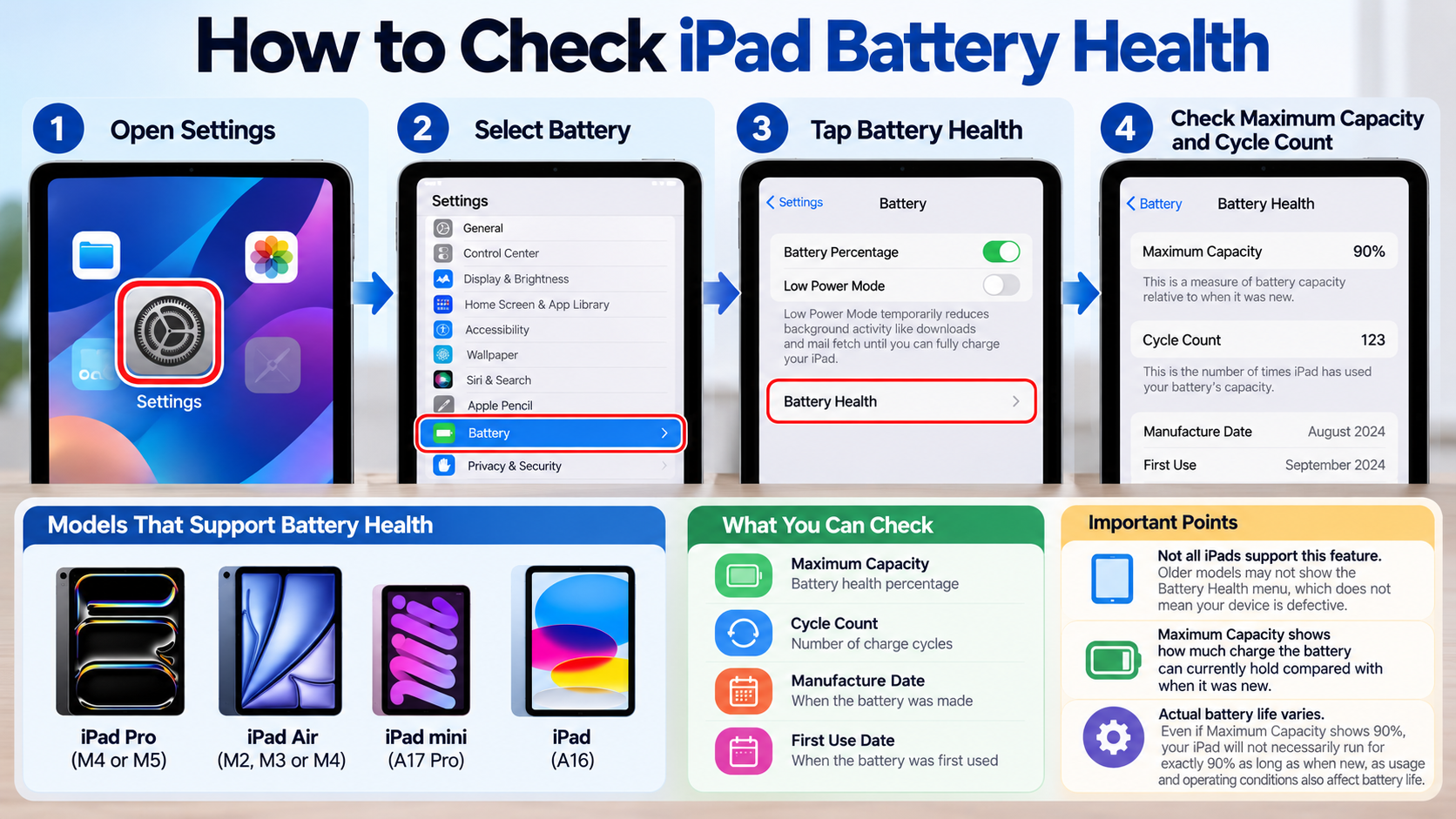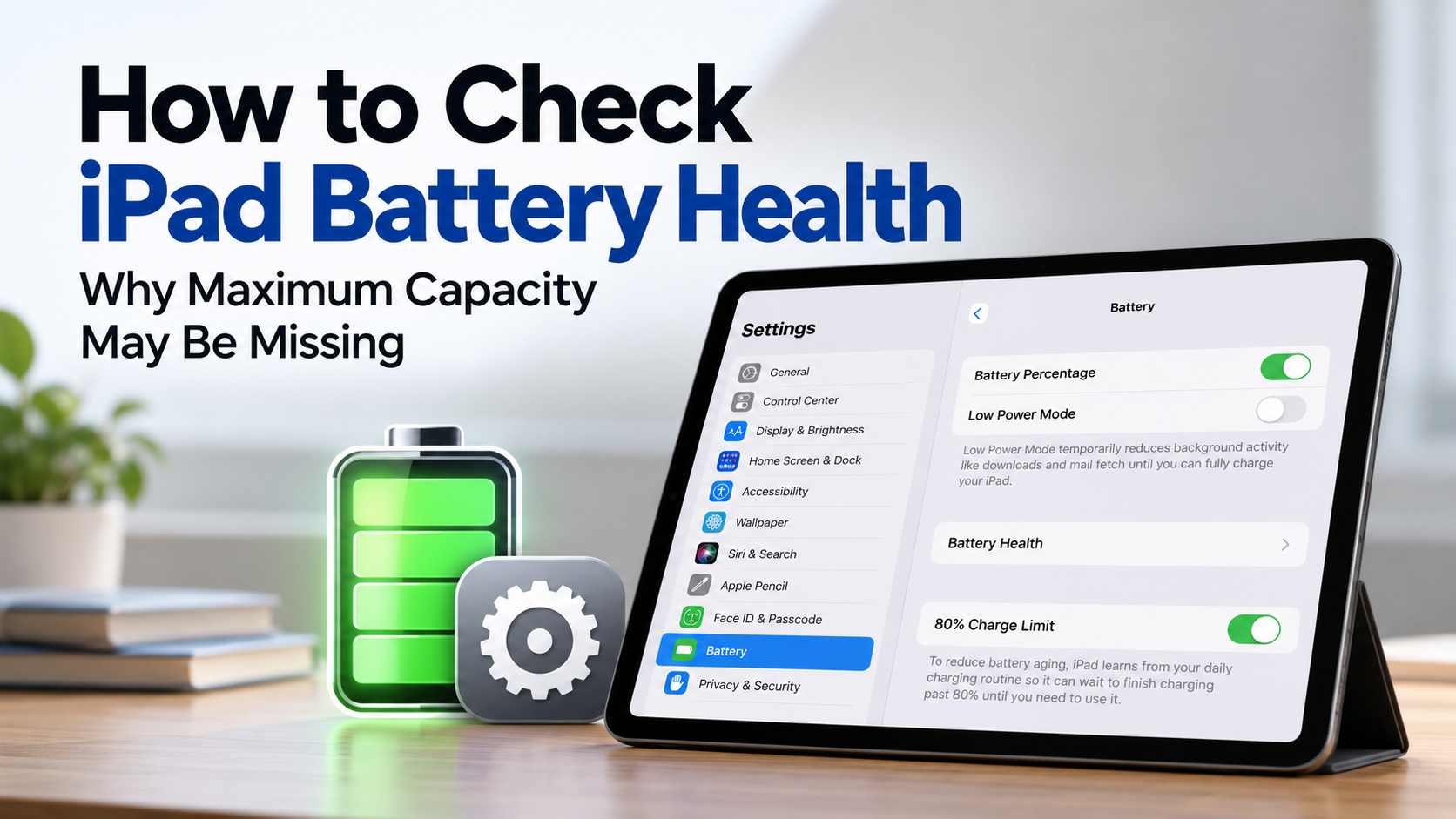
You can check iPad battery health by going to Settings → Battery → Battery Health. However, not every iPad supports this feature. The iPad Pro with M4 or M5, iPad Air with M2, M3, or M4, iPad mini with A17 Pro, and iPad with A16 allow you to view maximum battery capacity and charge cycle count.
On older iPads, battery health information may not appear even if you look for the same settings. This does not necessarily mean your device is defective. The available battery health features differ by model.
Where Can You Check iPad Battery Health?
On supported models, you can check maximum battery capacity directly in iPad settings without installing a separate app. The same screen also displays the battery's manufacturing date, first-use date, and charge cycle count.
The process is straightforward:
1. Open the Settings app on your iPad.
2. Select Battery.
3. Tap Battery Health.
4. Check Maximum Capacity and Cycle Count.
Maximum Capacity is the measurement commonly referred to as battery health percentage.
For example, if Maximum Capacity shows 90%, it indicates how much charge the battery can currently hold compared with its capacity when new.
However, 90% battery health does not mean the iPad will necessarily run for exactly 90% as long as it did when new. Actual battery life also depends on the apps running and the device's operating conditions.
Which iPad Models Support Maximum Battery Capacity Information?
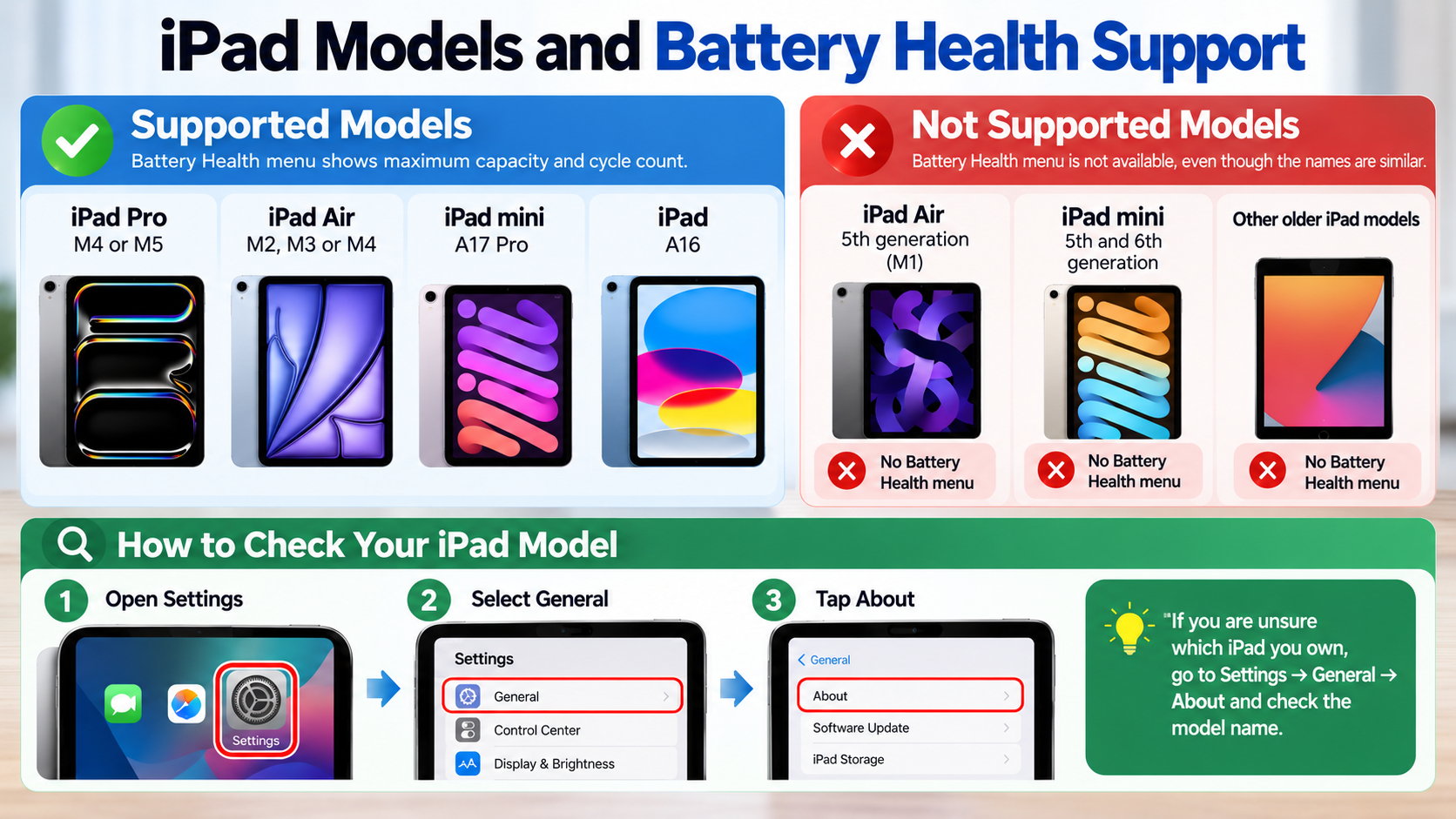
Apple officially supports battery health and charging history information on the following iPad models.
| iPad Model | Battery Health Available in Settings |
|---|---|
| iPad Pro M4 and M5 | Yes |
| iPad Air M2, M3, and M4 | Yes |
| iPad mini A17 Pro | Yes |
| iPad A16 | Yes |
| iPad mini 5th and 6th generation | Official menu not supported |
| iPad Air 4th and 5th generation | Official menu not supported |
| iPad 9th and 10th generation | Official menu not supported |
| iPad Pro M2 and earlier | Official menu not supported |
An important detail is that similarly named iPad models may have different levels of support.
The fifth-generation iPad Air uses the M1 chip, but it does not provide the Battery Health menu introduced for the iPad Air M2 and later supported models.
The same distinction applies to the iPad mini. The fifth- and sixth-generation models do not support this menu, while the A17 Pro model does.
If you are unsure which iPad you own, go to Settings → General → About and check the model name.
What Should You Do If the Battery Health Menu Is Missing?
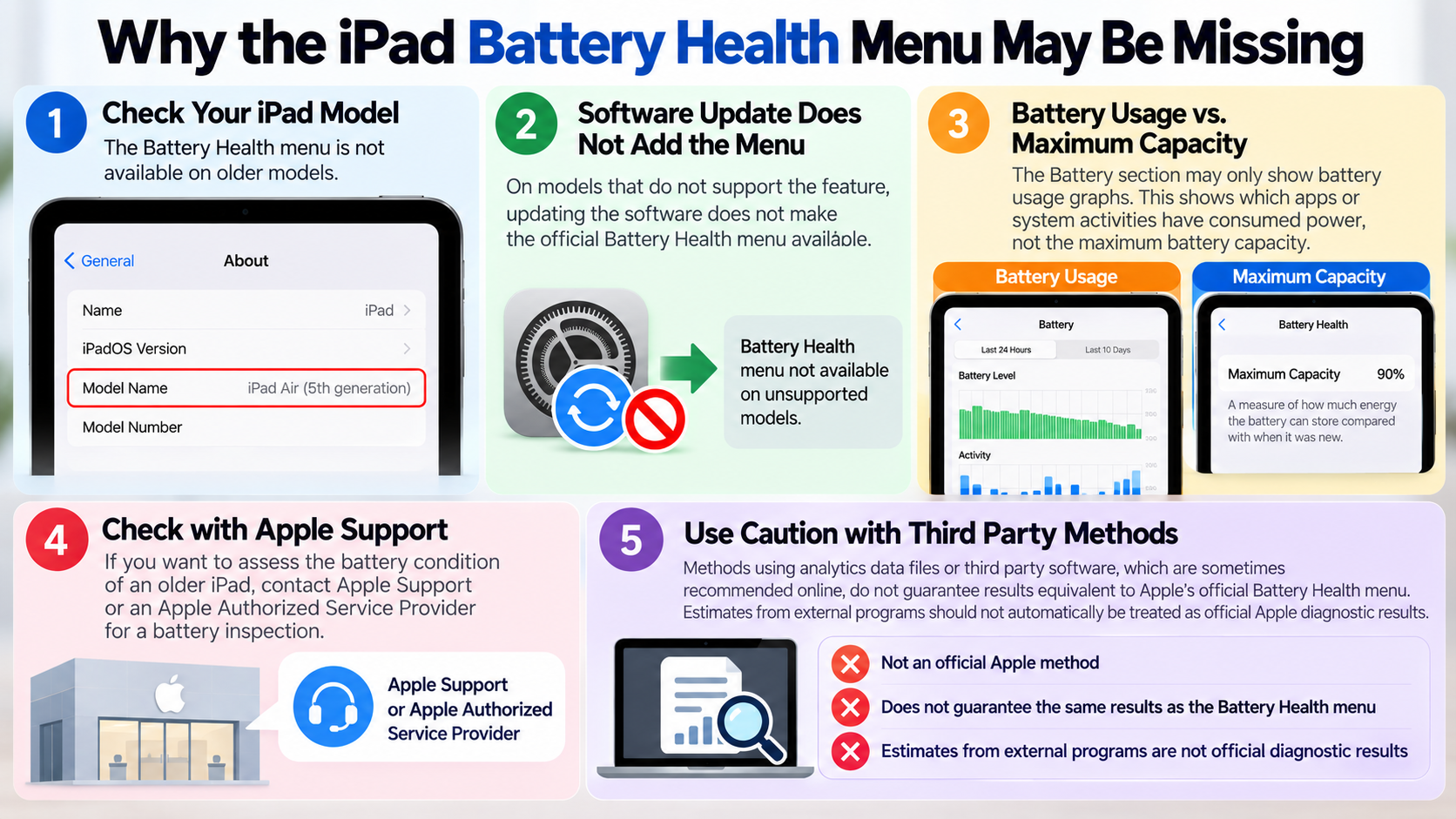
If the Battery Health menu does not appear on your iPad, first identify your model. On older models that do not support the feature, updating the software does not necessarily make the official battery health menu available.
If the Battery section in Settings only displays battery usage graphs, it is important to distinguish battery usage history from maximum battery capacity.
Battery usage information shows which apps or system activities have consumed power. Maximum battery capacity is a separate measurement indicating how much energy the battery can store compared with when it was new.
If you want to assess the battery condition of an older iPad, you can contact Apple Support or an Apple Authorized Service Provider to ask about a battery inspection.
Methods involving analytics data files or third-party software, which are sometimes recommended online, do not guarantee results equivalent to Apple's official Battery Health menu. Estimates displayed by external programs should not automatically be treated as official Apple diagnostic results.
What Does the iPad Battery Cycle Count Mean?
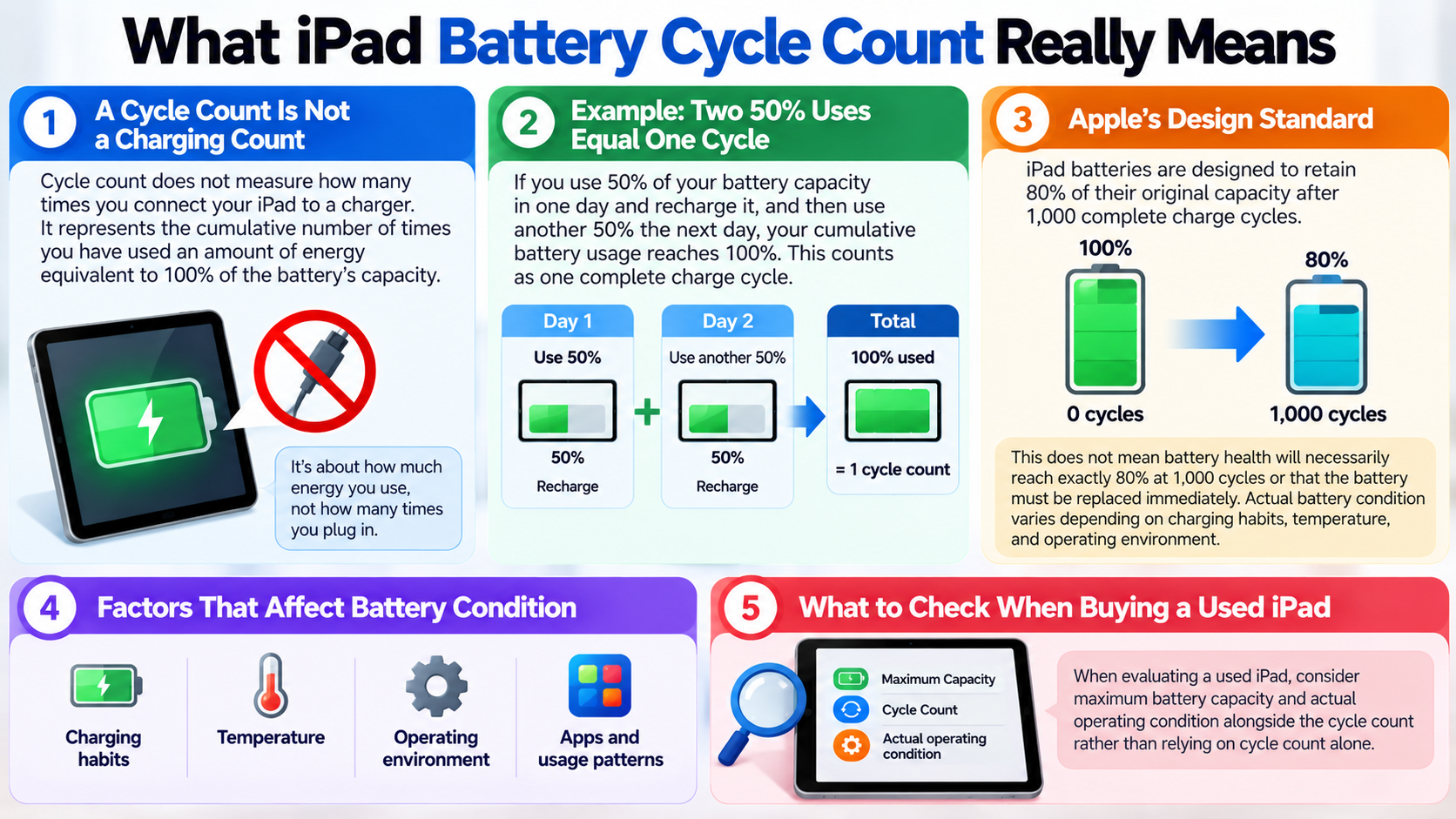
Battery cycle count does not measure how many times you connect your iPad to a charger. Instead, it represents the cumulative number of times you have used an amount of energy equivalent to 100% of the battery's capacity.
For example, suppose you use 50% of your battery capacity in one day and recharge it. If you use another 50% the following day, your cumulative battery usage reaches 100%.
Even though that usage occurred across two separate periods, it counts as one complete charge cycle.
Apple explains that iPad batteries are designed to retain 80% of their original capacity after 1,000 complete charge cycles.
However, this does not mean battery health will necessarily reach exactly 80% at 1,000 cycles or that the battery must be replaced immediately at that point.
Actual battery condition varies depending on charging habits, temperature, and operating environment.
When evaluating a used iPad, it is therefore better to consider maximum battery capacity and actual operating condition alongside the cycle count rather than relying on cycle count alone.
Should You Replace Your iPad Battery When Health Reaches 80%?
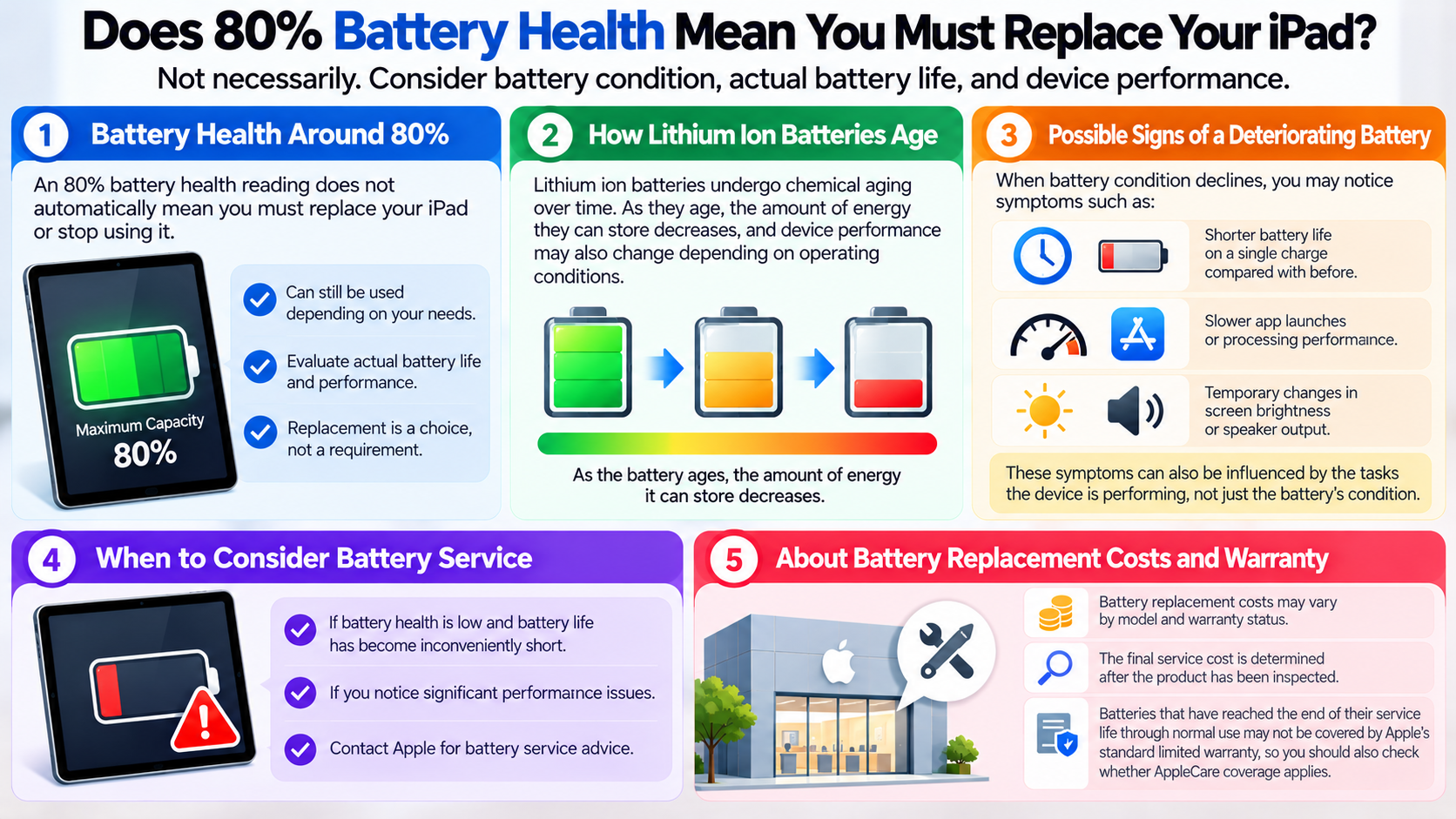
A battery health reading of 80% does not automatically mean you must replace your iPad immediately or stop using it. The decision should take into account battery condition, actual battery life, and any noticeable performance degradation.
Lithium-ion batteries undergo chemical aging over time. As they age, the amount of energy they can store decreases, and device performance may also change depending on operating conditions.
When battery condition deteriorates, you may notice symptoms such as:
Shorter battery life on a single charge compared with before.
Slower app launches or processing performance.
Temporary changes in screen brightness or speaker output.
These symptoms can also be influenced by the tasks the device is performing, not just the battery's condition.
If battery health is low and battery life has become inconveniently short, consider contacting Apple for battery service advice.
Battery replacement costs may vary by model and warranty status, and the final service cost is determined after the product has been inspected. Batteries that have reached the end of their service life through normal use may not be covered by Apple's standard limited warranty, so you should also check whether AppleCare coverage applies.
Should You Enable the 80% Charge Limit to Preserve Battery Health?
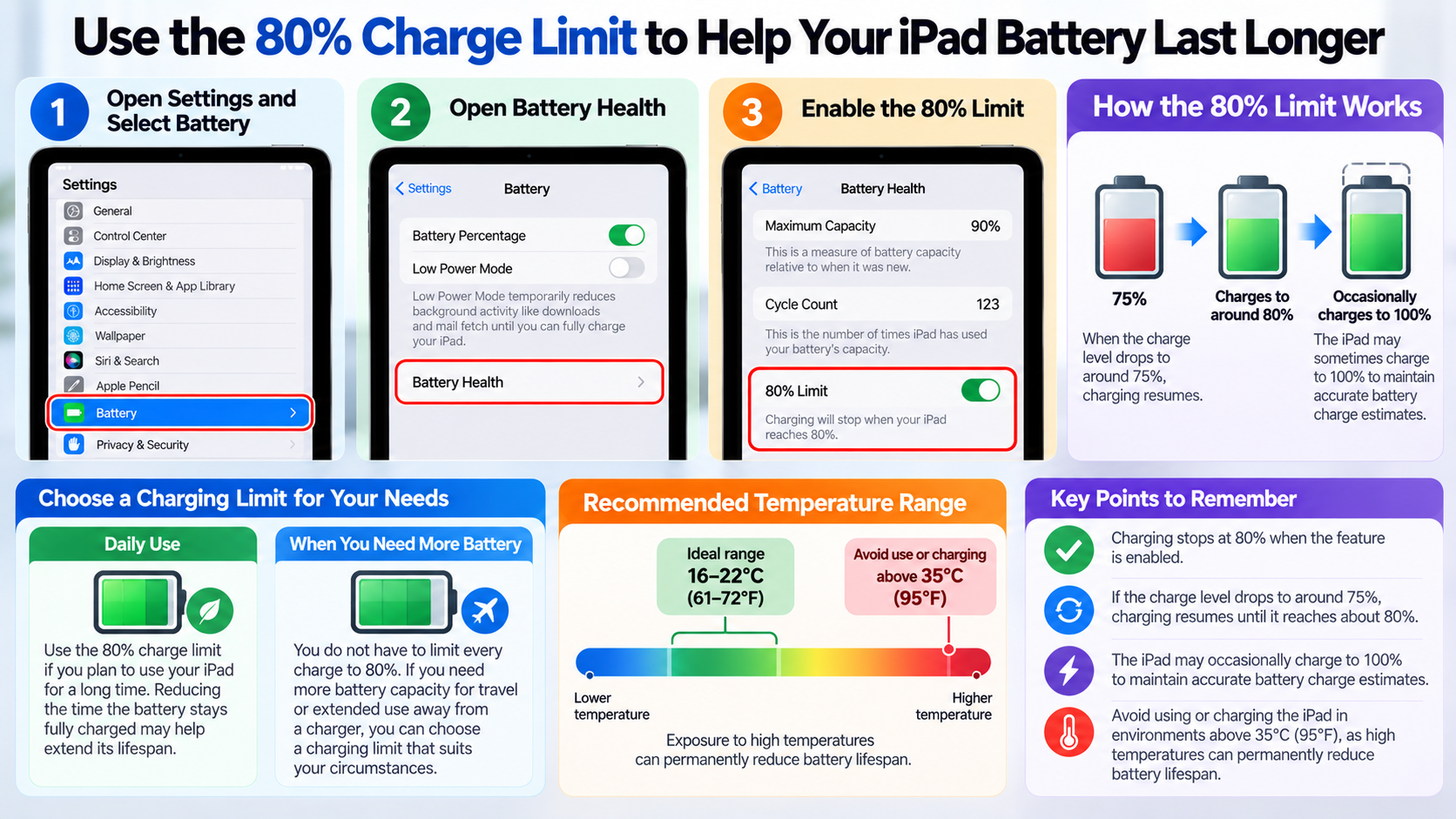
If you plan to use your iPad for a long time, you can take advantage of the 80% charge limit feature available on supported models.
Reducing the amount of time a battery remains fully charged may help extend its lifespan.
To enable the feature:
1. Open Settings and select Battery.
2. Open Battery Health.
3. Enable the 80% Limit option.
When this feature is enabled, charging stops when the battery reaches 80%. If the charge level subsequently drops to around 75%, charging resumes until it reaches approximately 80% again.
Even with the 80% limit enabled, the iPad may occasionally charge to 100% to maintain accurate battery charge estimates. This does not indicate that the feature is malfunctioning.
However, you do not have to limit every charge to 80%. If you need more battery capacity for travel or extended use away from a charger, you can choose a charging limit that suits your circumstances.
Temperature management is also important.
Apple identifies an ideal ambient temperature range of 16–22°C (61–72°F) and advises avoiding use or charging in environments where the ambient temperature exceeds 35°C (95°F). Exposure to high temperatures can permanently reduce battery lifespan.
What If Battery Health Is Normal but Battery Life Is Short?
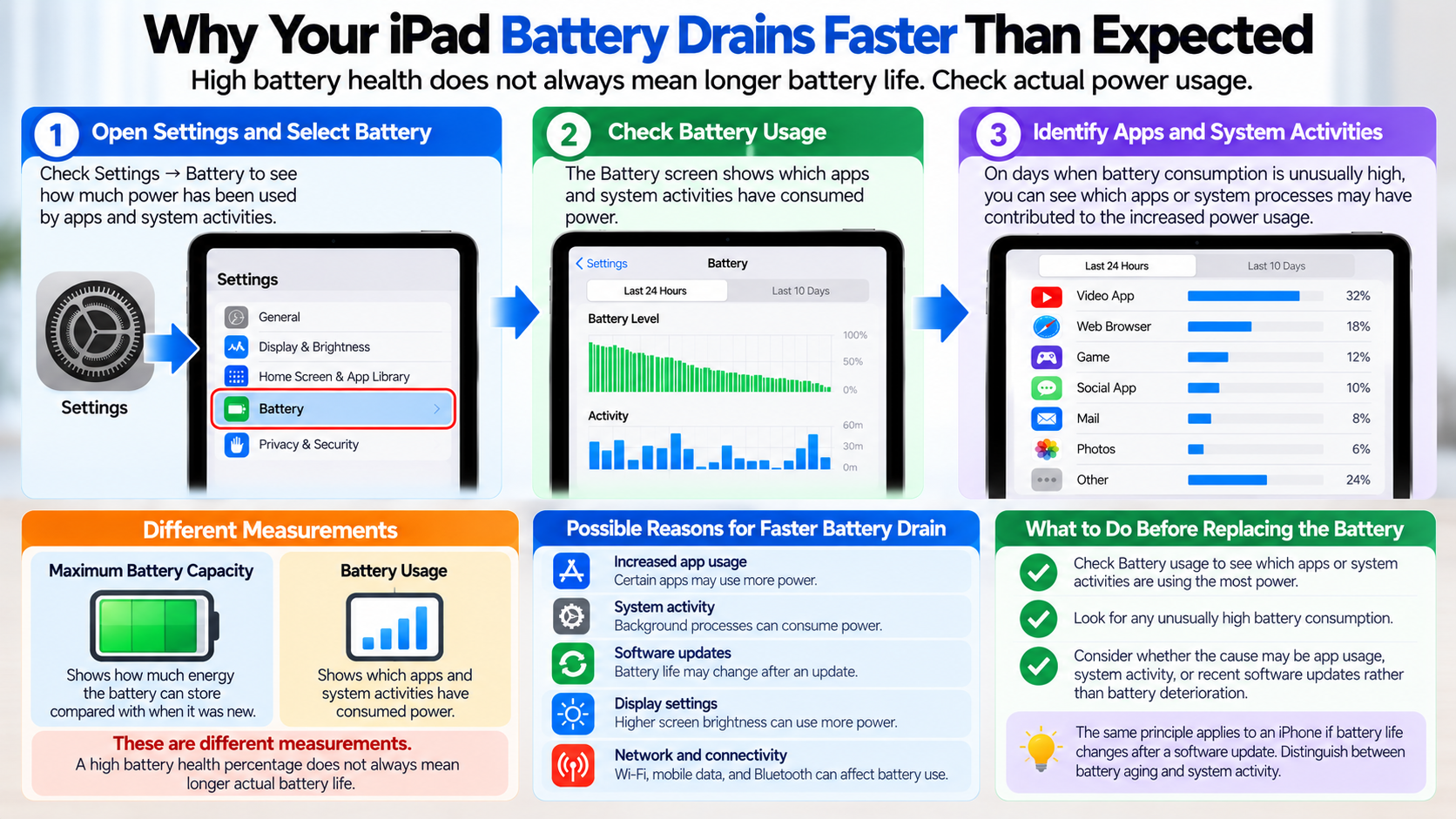
Even when maximum battery capacity is relatively high, actual battery life may feel shorter than expected. This is because battery usage and maximum battery capacity measure different things.
In this situation, start by checking Settings → Battery.
The Battery screen lets you examine how much power has been consumed by apps and system activities.
On days when battery consumption is unusually high, you can identify which apps or system processes may have contributed to the increased power usage.
Rather than deciding to replace the battery based solely on its health percentage, reviewing actual power consumption can help you distinguish between battery deterioration and other causes of excessive battery use.
The same principle applies to an iPhone if battery life changes after a software update. It is important to distinguish battery aging from system activity. Related information can help explain this difference.
Frequently Asked Questions About Checking iPad Battery Health
Can You Check Battery Health on the iPad mini 5?
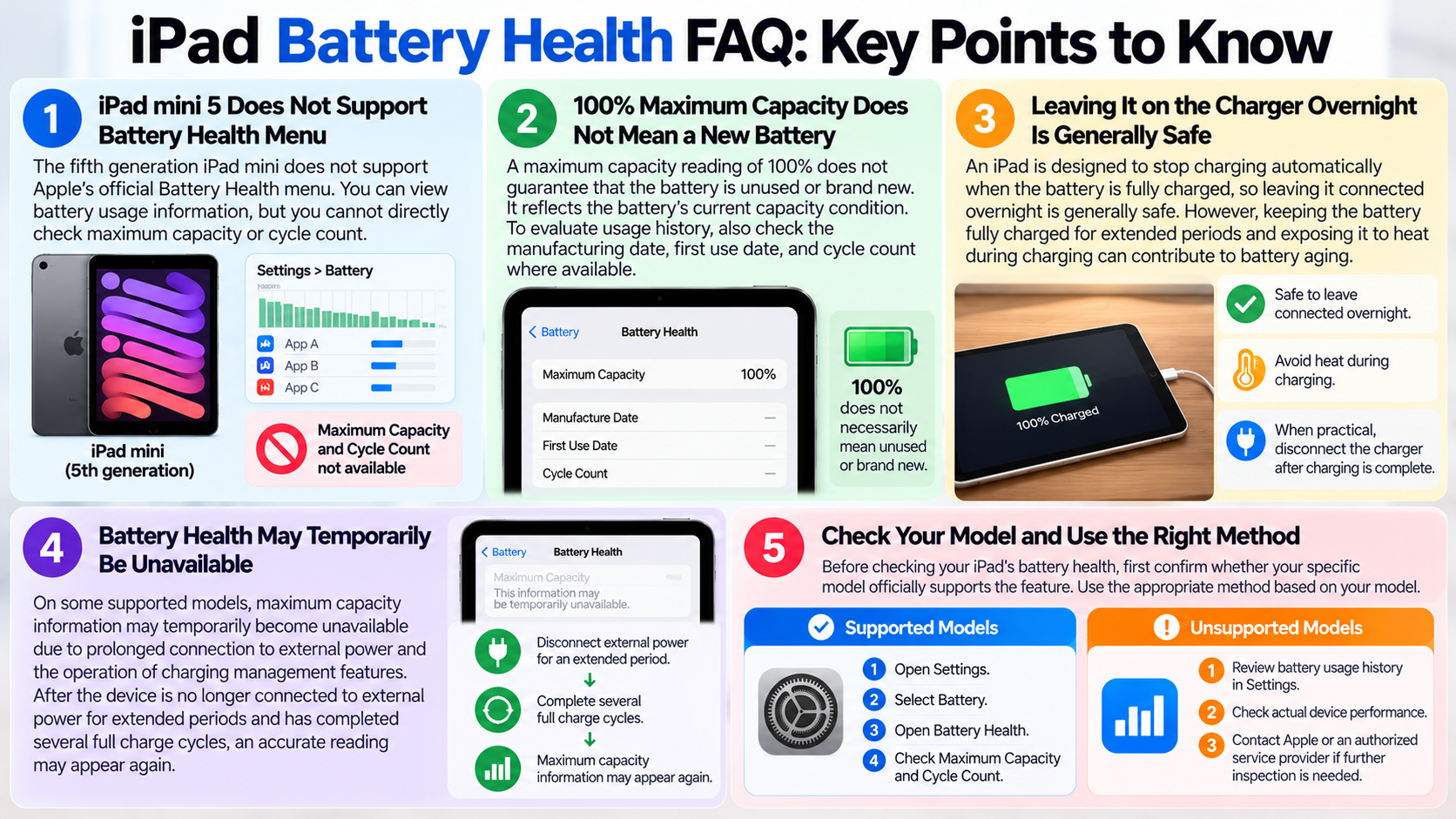
The fifth-generation iPad mini does not support Apple's official Battery Health menu. You can view battery usage information in Settings, but you cannot directly check maximum battery capacity or cycle count through the same built-in feature available on newer supported models.
Does 100% Battery Health Mean an iPad Has a Brand-New Battery?
Not necessarily. A maximum capacity reading of 100% does not guarantee that the battery is unused or brand-new. Maximum battery capacity reflects the battery's current capacity condition. To evaluate its usage history, you should also examine the manufacturing date, first-use date, and cycle count where those details are available.
Does Charging an iPad Overnight Damage the Battery?
An iPad is designed to stop charging automatically when the battery is fully charged, so leaving it connected to a charger overnight is generally safe.
However, keeping the battery fully charged for extended periods and exposing it to heat during charging can contribute to battery aging. When practical, disconnecting the charger after charging is complete may help reduce these effects.
Why Does Maximum Battery Capacity Suddenly Stop Appearing?
On some supported models, maximum battery capacity information may temporarily become unavailable due to prolonged connection to external power and the operation of charging management features.
After the device is no longer connected to external power for extended periods and has completed several full charge cycles, an accurate maximum capacity reading may appear again.
Before checking your iPad's battery health, first confirm whether your specific model officially supports the feature.
On supported models, check maximum battery capacity and cycle count in Settings. On unsupported models, review battery usage history and actual device performance, then contact Apple or an authorized service provider if further inspection is needed. This is the most reliable approach to evaluating your iPad battery's condition.